Wingman Join the beta

Point at your storefront.
Your agent edits the Liquid.

Wingman is a desktop app for Shopify theme developers. It sees the template, section, block and line of Liquid behind every pixel of your preview, and changes it the way a theme developer would.

Private beta · macOS · built on the official Shopify CLI and Theme Check

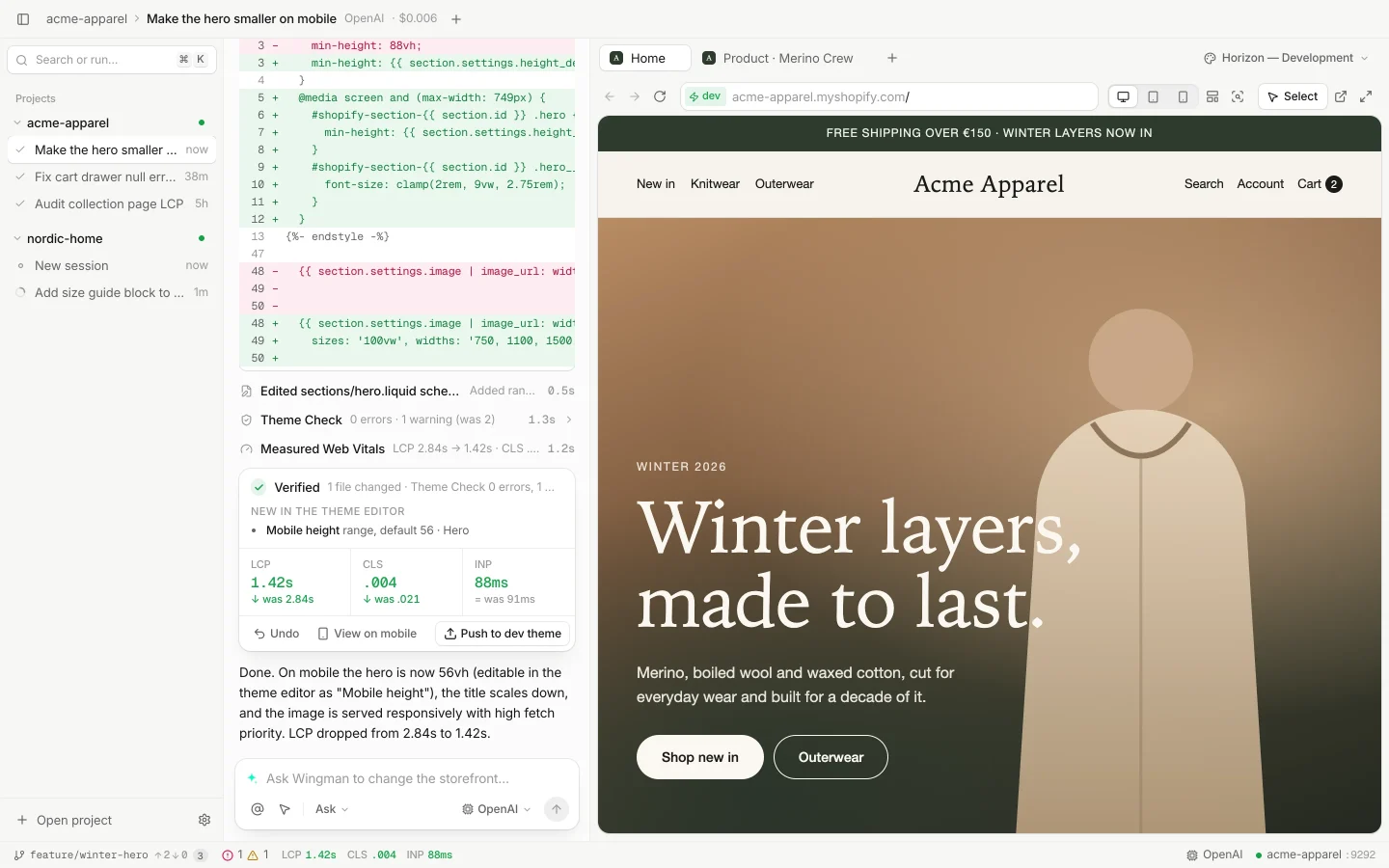
Wingman with a theme open: the chat shows the diff of sections/hero.liquid and a Verified result (LCP 1.42s, was 2.84s; CLS .004), next to the live storefront preview with the hero.
Wingman on a demo project: the hero was picked in the preview, the agent made it smaller on mobile with a setting the merchant can still change, and Wingman verified it.

From a click to a verified change.

One loop in one window: what you pointed at, what the agent changed, and whether the theme still passes.

01 Select

Point at the storefront

Click any element in the live preview. Wingman resolves the section, block and template behind it, down to the line (sections/hero.liquid:48), before the agent reads a single file.
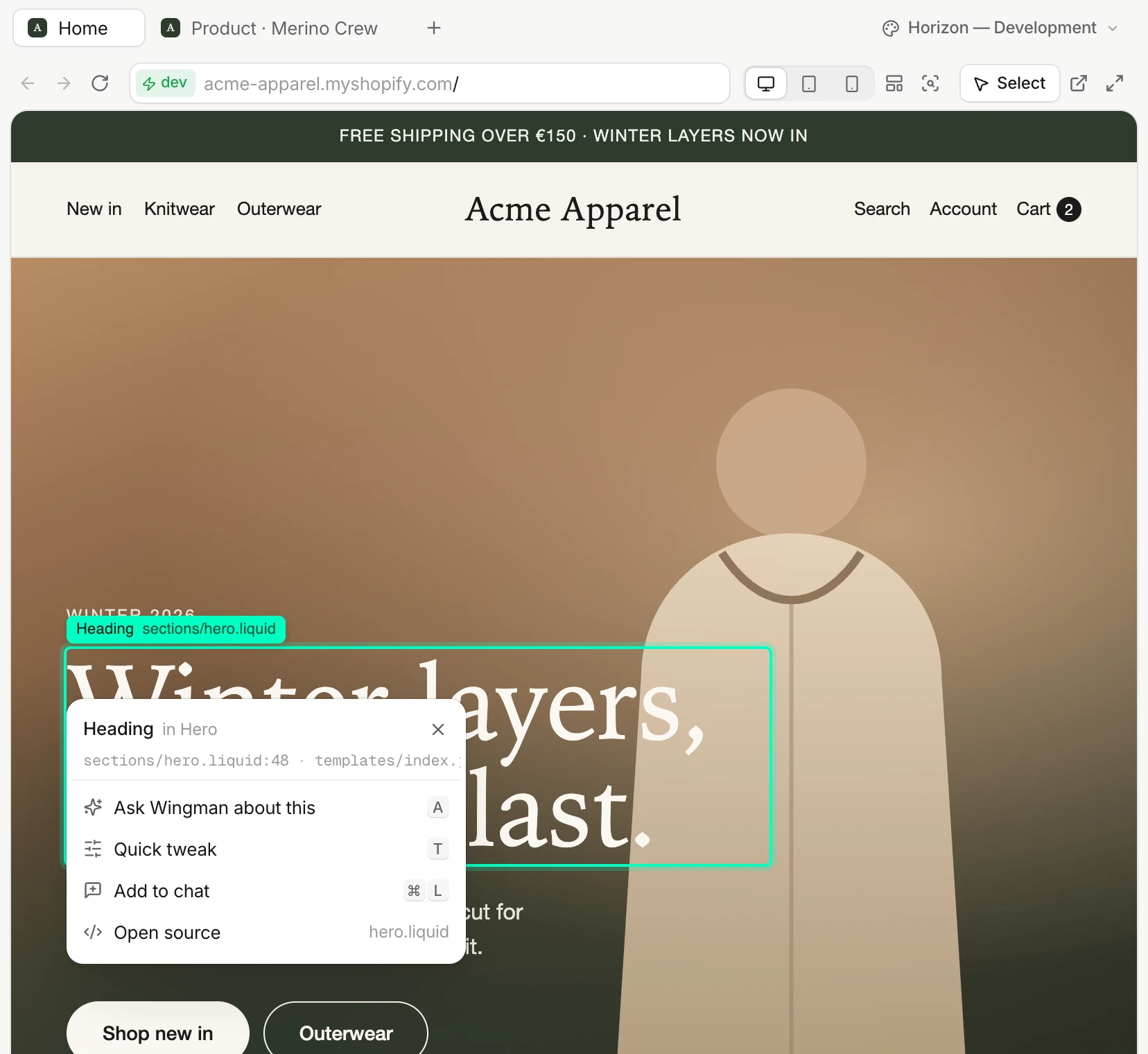
The storefront preview in Wingman with the hero heading selected. A card shows Heading in Hero, sections/hero.liquid line 48 and templates/index.json, with actions to ask Wingman, quick tweak, add to chat and open the source.

02 Ask

It looks before it edits

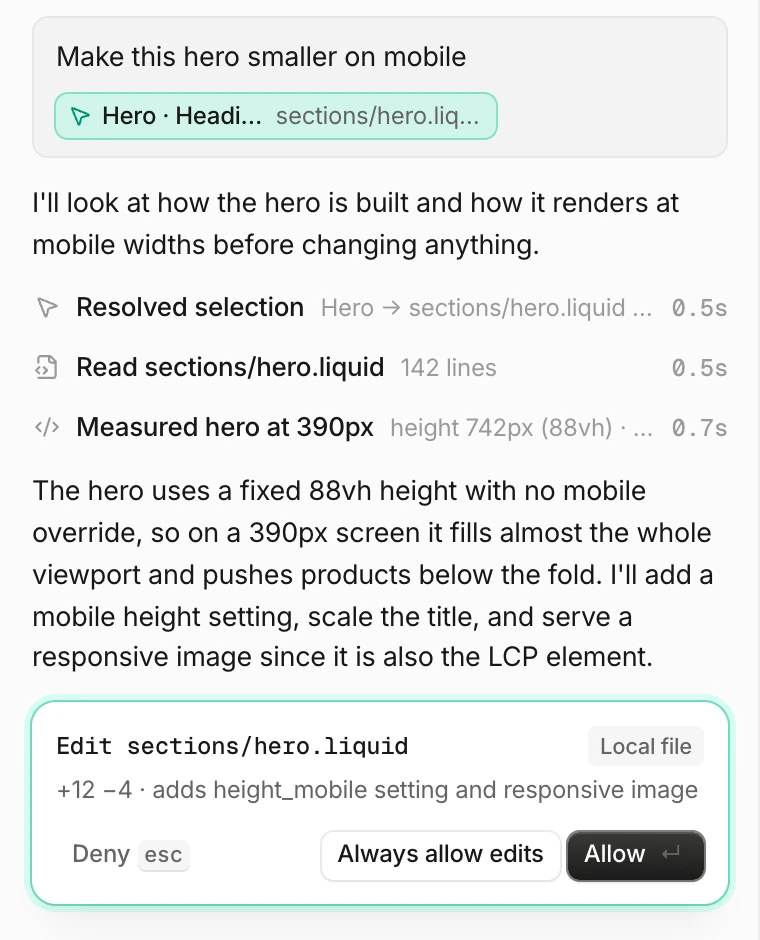
The agent reads the section and measures the page first: an 88vh hero is 742px tall on a 390px screen. Then it proposes the edit, and nothing is written until you allow it.

The agent's plan in the chat: it resolved the selection, read sections/hero.liquid, measured the hero at 390px, explained the fix, and asks to allow an edit to sections/hero.liquid.

03 Edit

Edits a theme developer would make

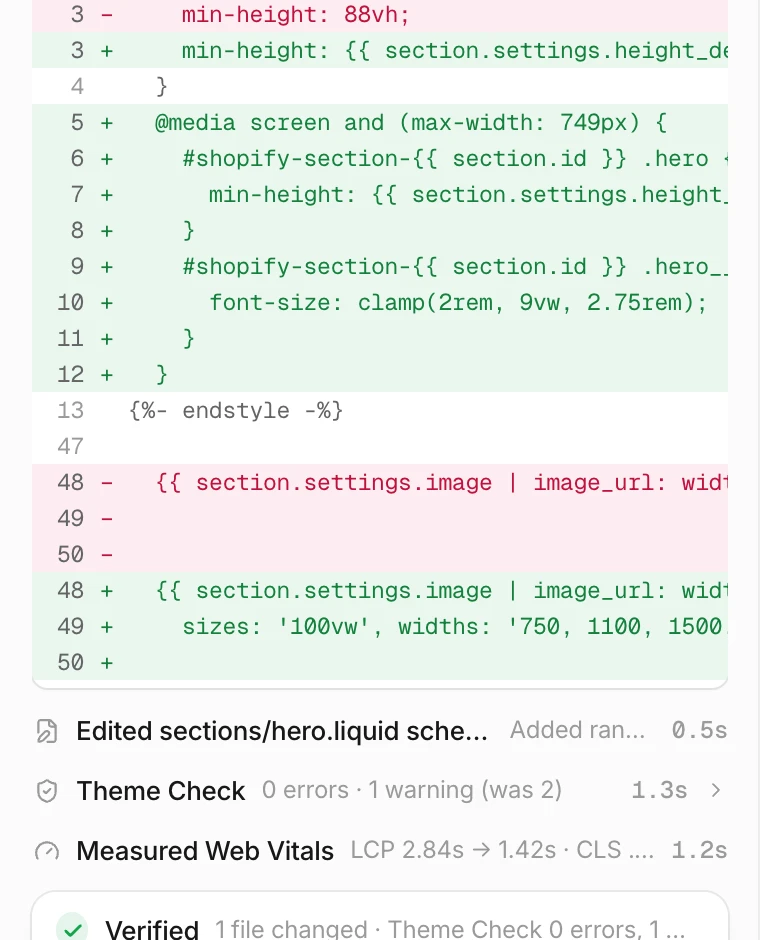
Hardcoded values become settings the merchant can still change in the theme editor. Breakpoints follow the theme's own 749px, and the hero image gets a srcset and fetchpriority.

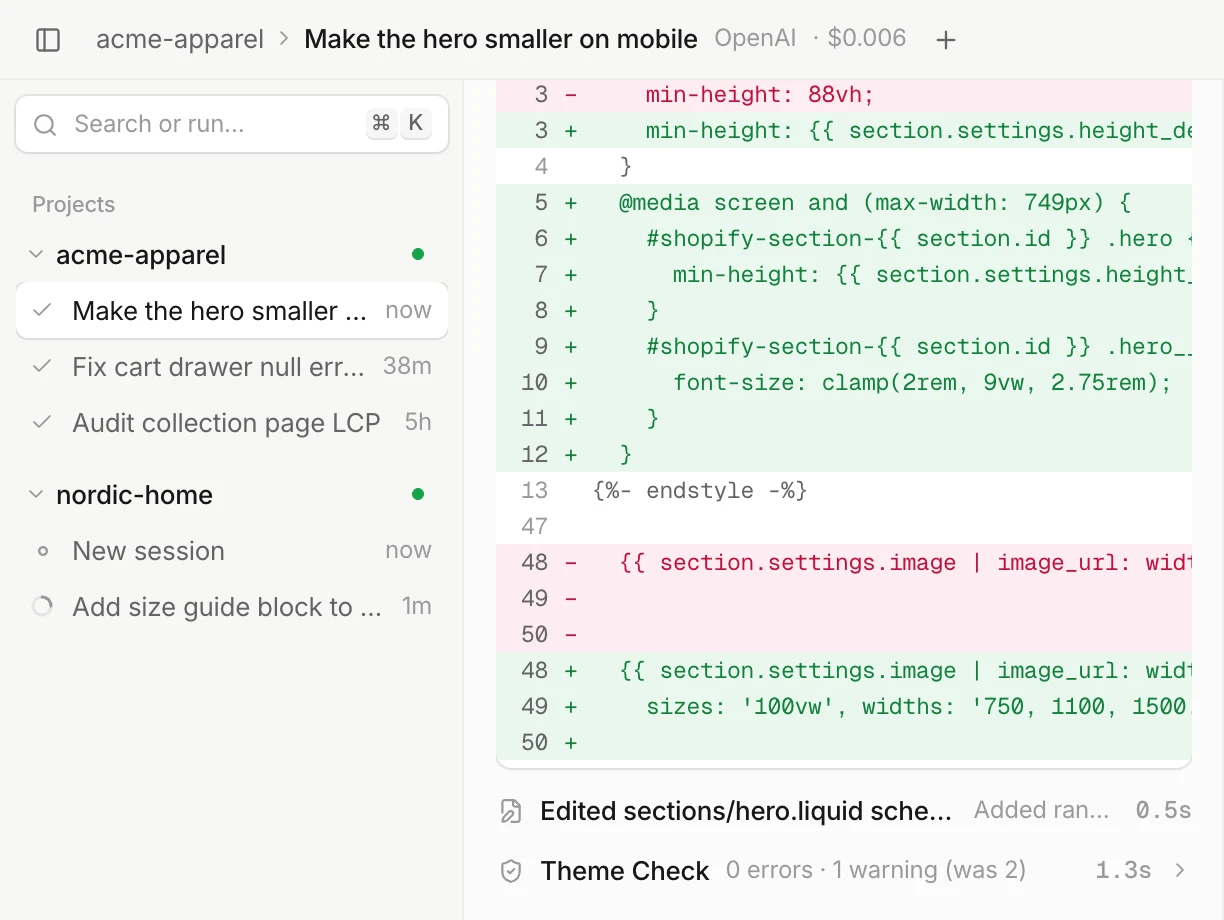
The diff of sections/hero.liquid: the fixed 88vh height becomes a section setting, a mobile media query at 749px adds a smaller height and title size, and the image tag gets responsive sizes.

04 Verify

Verified, not just generated

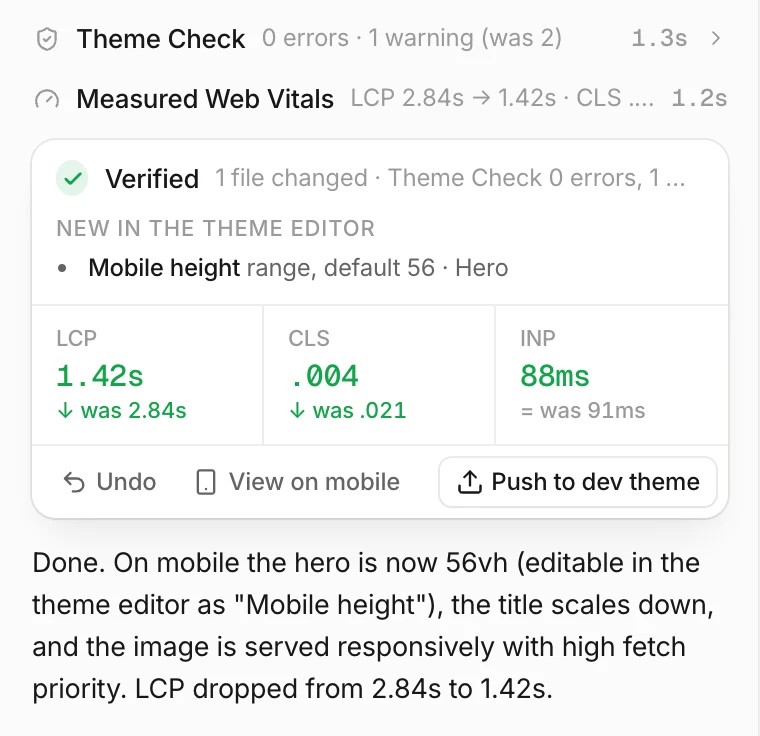
theme dev hot reloads the preview, Theme Check runs, and Web Vitals are measured again on the same page. Undo is one click; push goes to your development theme.

The Verified card: Theme Check 0 errors, a new Mobile height setting in the theme editor, LCP 1.42s down from 2.84s, CLS .004 down from .021, INP 88ms, with Undo, View on mobile and Push to dev theme.

Performance

Down to the line of Liquid

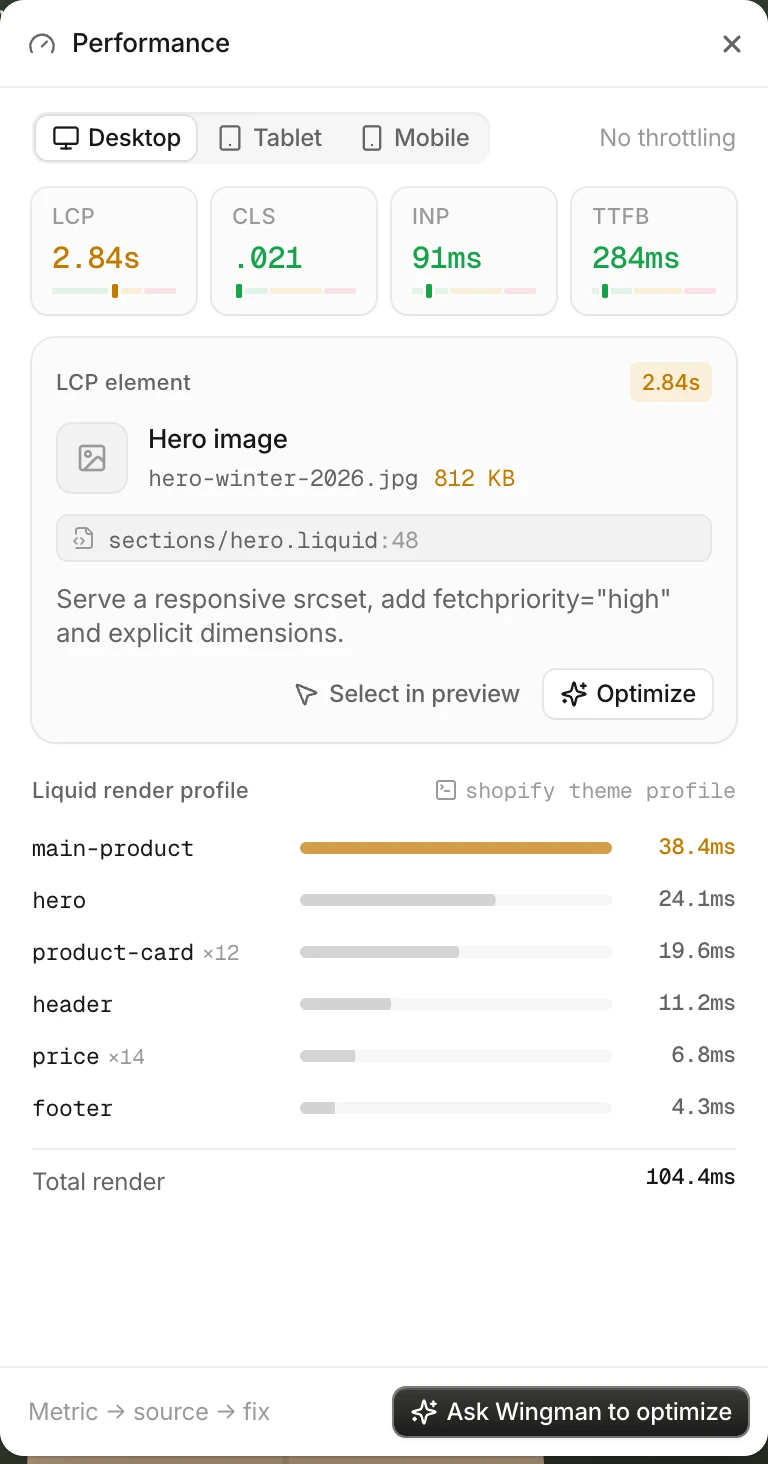
Web Vitals on desktop, tablet and mobile, the LCP element traced to its file and line, and the Liquid profile per section. Any of it becomes a prompt in one click.

The Performance panel: LCP 2.84s, CLS .021, INP 91ms, TTFB 284ms; the LCP element is the hero image at sections/hero.liquid line 48; the Liquid render profile lists main-product, hero, product-card and other sections by time.

One change, start to finish.

Recorded in real time on the demo project: pick the hero, ask, allow the edit, and watch Wingman verify it before you see it on a phone.

The agent reads the hero, measures it at 390px, and adds a mobile height the merchant can still change. Theme Check passes and LCP drops from 2.84s to 1.42s.

Your model. Our Shopify tools.

Wingman runs the agent itself, over your provider's API with your own key, kept in the macOS Keychain. Pick a model per session; the tools and the checks stay the same.

Providers

  • OpenAIGPT models over the Responses API. The default.
  • ClaudeAnthropic's models over the Messages API.
  • OpenCodeOpen coding models from a Go plan, or pay per use with Zen.
  • OpenRouterMany providers behind one key.

Shopify tools, the same for every model

  • get_shopify_contextSelection, section, block, template and settings
  • get_rendered_htmlWhat the storefront actually rendered
  • run_theme_checkOffenses for the files it touched
  • evaluate_liquidLiquid against the store's real data
  • profile_liquidRender time per section and line
  • get_metafield_definitionsReal metafield names and types
  • list_themesThe store's themes and their roles
  • share_previewA client preview link, after asking you

No shell. File tools stay inside the theme folder, and every write goes through your permission mode.

The whole Shopify CLI, with the right friction.

Wingman runs the official CLI on your machine. Every command shows exactly what will run, and anything that reaches the live theme asks twice: review the command, then type the store handle.

  • theme devone per project, hot reload
  • theme pushlive asks twice
  • theme publishasks twice
  • theme pullshows what changed
  • theme shareclient preview link
  • theme packagezip, ready to upload
  • theme checkafter every edit
  • theme consoleLiquid on real data
  • theme profilemapped to your lines
  • theme metafields pullreal field names
  • theme list · info · openthemes panel
  • theme rename · duplicate · deleteinline, reviewed
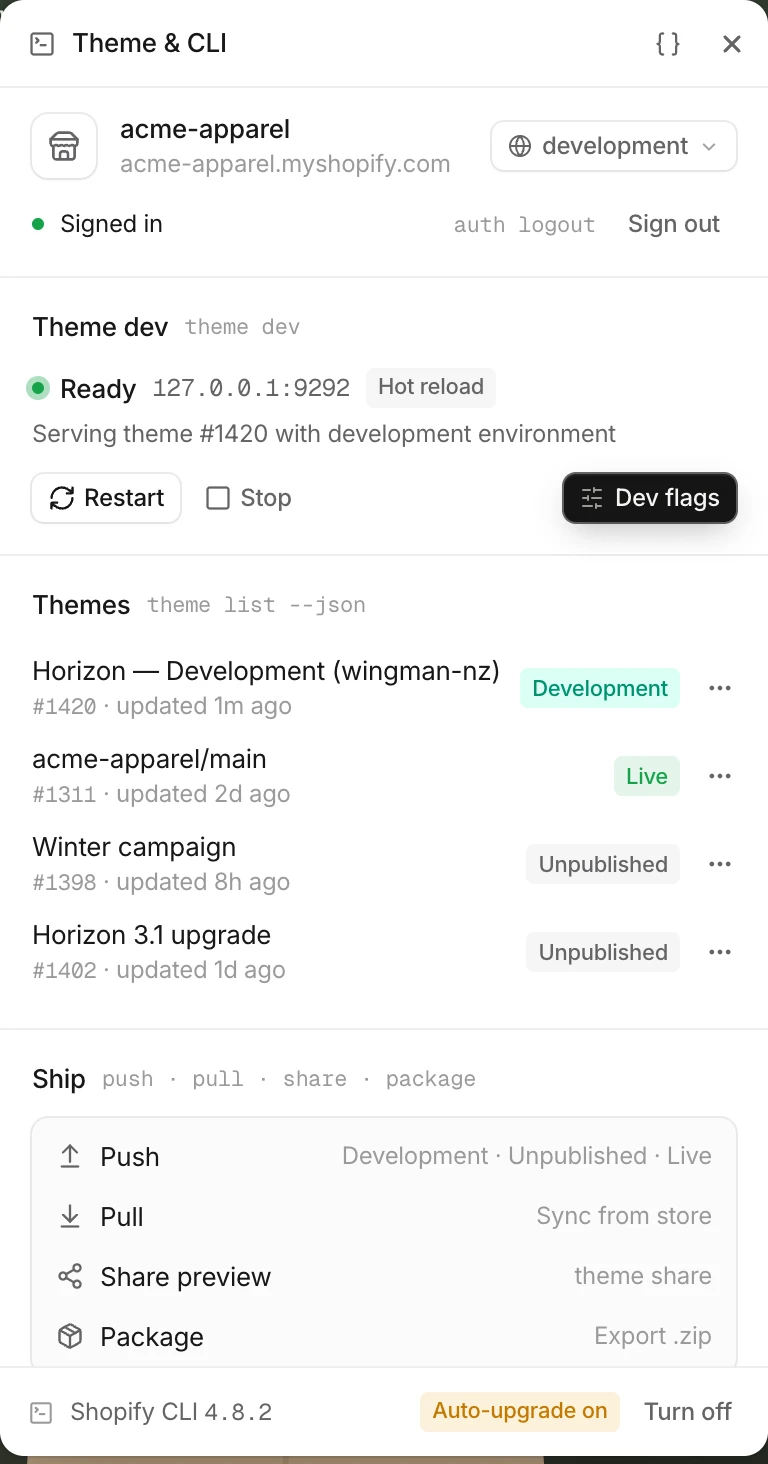
The Theme and CLI panel: signed in to acme-apparel, theme dev ready on 127.0.0.1:9292 with hot reload, the store's themes with their roles, push, pull, share preview and package, and the Shopify CLI version with auto-upgrade control.

Many clients, many stores, one window.

Every project gets its own theme dev server and port, preview tabs, agent sessions and snapshots. The CLI keeps one development theme per store, so a second project on the same store gets its own unpublished theme instead of overwriting the first.

Wingman's sidebar with two projects, acme-apparel and nordic-home, each with its own agent sessions, next to the diff of the current session.

Safety

  • Runs on your Mac

    Your theme folder stays local. Files reach your store through the Shopify CLI, and the agent's context goes only to the provider you picked.

  • Secrets in the Keychain

    API keys, storefront and Theme Access passwords live in the macOS Keychain and reach the CLI through the environment, never the command line.

  • Snapshots before every turn

    Wingman snapshots the theme before each agent turn and each pull, so undo puts every file back, not just the last one.

Questions

Is Wingman made by Shopify?

No. Wingman is an independent product, not affiliated with or endorsed by Shopify. It is built on the official Shopify CLI and Theme Check, and works with themes you develop in code.

Who's behind Wingman?

Nikita Zanella, a Shopify theme developer. Wingman started as the tool Nikita wanted for client work: an agent that understands sections, blocks and settings, and proves its changes before they ship.

Does it replace the theme editor?

No. The theme editor is where merchants customize a store; Wingman is where developers change the code behind it. Settings an agent adds to a section show up in the theme editor like any other.

Which models can I use?

OpenAI, Claude, OpenCode (Go or Zen) and OpenRouter, with your own API key stored in the macOS Keychain. You pick the model per session, and every model gets the same Shopify tools and the same verification.

Where does my code go?

Wingman runs locally and works on your theme folder. Theme files are sent to your store by the Shopify CLI, and the context an agent needs is sent to the runtime you chose, under that provider's terms.

What do I need to use it?

A Mac, the Shopify CLI, a theme in a local folder (git recommended) with access to its store, and at least one of the supported agent runtimes.

Windows or Linux?

macOS comes first. If you need another platform, email [email protected] and tell us.

How much does it cost?

Pricing isn't set yet. Beta access goes out by invitation from the waitlist. Agent usage is billed by the provider you choose, as it is today.

Your storefront is the interface.

Invites go out in small batches to theme developers and agencies. Tell us how you work and we'll send one when there's room.

  • macOS, Apple silicon and Intel
  • Online Store 2.0 themes in a local folder
  • Your own model provider and key

Made by Nikita Zanella, on a mission to build the agentic theme development platform for Shopify developers.

Join the beta

I work as

Your invite, and a short note when something ships. Unsubscribe anytime.